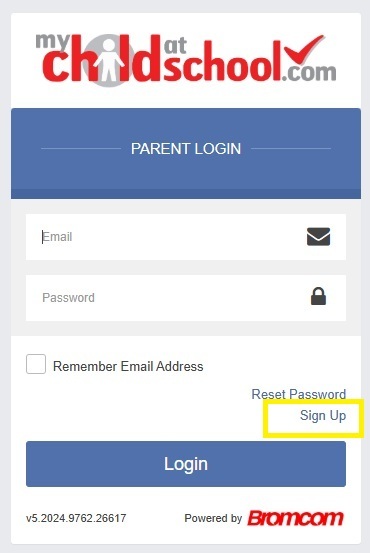
Go the website: https://www.mychildatschool.com/
And choose Sign Up.
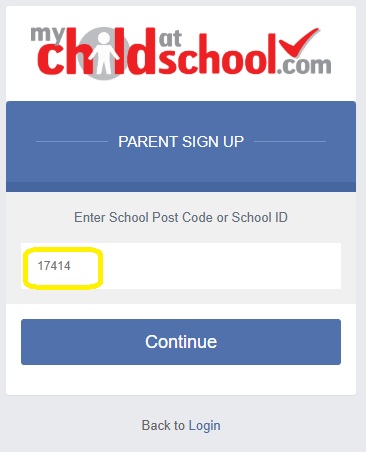
At this point there is no need to input any other details.
17414
and click continue
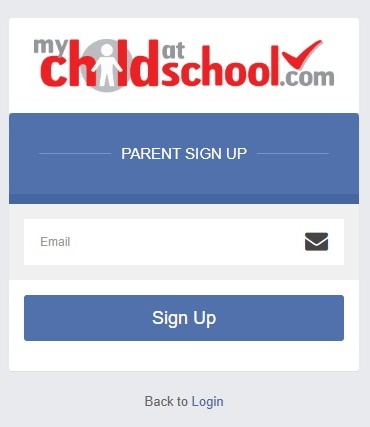
This must be the email address that is recorded against your contact record at school, if you need to check this please contact the school office.
After a few minutes an email will be sent from 17414@bromcomcloud.co.uk which contains a link to verify your account.
Once that link is clicked, a password needs to be created. This needs to be a complex password, this needs to be 8 characters long including one upper case one lower case and a special character.
You can now log-in to MCAS.
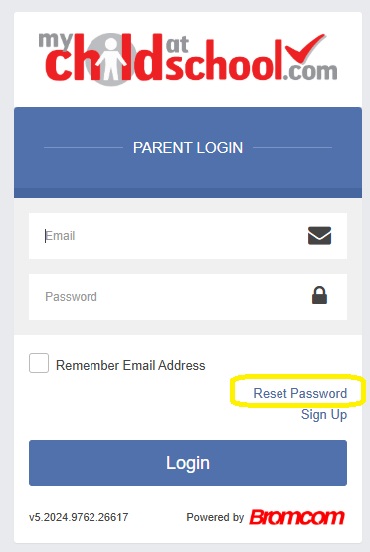
Q: My password does not work or I have forgotten it.
A: On the first page choose the reset password option.
Q: I tried to set a password and it did not work.
A: Try another password, or the same password with a different special character. The $ special character sometimes is not accepted.
Q: I can only see one of my children.
A: This is due to duplicate contacts in our system. You need to email the school office and include the names of all children that are attending or have attended school and we will check for duplicate contacts.
Q: Is there an app?
A: Yes, the links are on the login page, however the website version will always have the most up to date features. This is due to the way Apple and Google having to approve the app before making it available. Additionally, when a new release occurs, the stores do not send the update to everyone at once, it sends in batches.
Q: I did not get the activation email.
A: It is likely that the email has been sent into your junk or spam folders. Please check those first, this is especially the case for Hotmail accounts. The email itself is non-descript and does look like junk, we cannot alter the appearance of the email to brand it.
Q: Can you set a password for me?
A: No, the system does not allow us to do this, we can send a password reset email if your account is already registered, but we do not have access to setting passwords.
Q: How do I view and add dinner money in the MCAS Mobile App?
A: How to view and add Dinner Money in the MCAS App – Bromcom – Documentation Centre
Q: How do I view and add dinner money in MCAS ?
A: How to view and add Dinner Money in MCAS – Bromcom – Documentation Centre